The catalogues UCAC3, UCAC4, NOMAD and PPMXL integrate many magnitude bands which are not always defined for all the objects in the catalogues. This results sometimes into field displays which are difficult to analyze and match against CCD images. Furthermore, a given optical configuration can be more or less sensitives in different magnitude bands and again, matching a C2A field against a CDD images can be made difficult. In order to address these two problems, C2A provides a couple of tools to modifiy the magnitude representation of the stars in a field according to parameters that can be fully customized. They are namely the Magnitude Band Priorities and the Compound Instrumental Magnitudes.
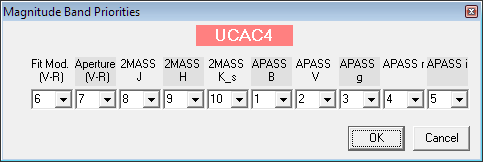
For the UCAC3, UCAC4, NOMAD and PPMXL catalogues, the advanced options that can be accessed through the button Advanced Options... in the Star tab of the Options dialog box allow you to select a specific magnitude band called First Available Band. The button Set... displays a dialog box as the one below for the UCAC4 catalogue:
In this dialog box, it is possible to define the priority order of the magnitude bands to be used in the field displays. If an object does not have a magnitude specified for a given band, the next band defined in the priority list will be used to represent the object in the field map. In the UCAC4 example above, the priority magnitude to be used will the APPAS B then the APASS V and so on until the 2MASS K_s band.
When an object with a priority magnitude band is identified in a field, the reported value in the Magnitude field is the one corresponding to the magnitude band used in the star display. If one wants to know exactly to which band this magnitude relates to, it is necessary to look at the detailed magnitudes provided in the Control Panel or in the object information window once the object has been identified.
In the same manner as for the Magnitude Band Priorities, and only for the UCAC3, UCAC4, NOMAD and PPMXL catalogues, the advanced options that can be accessed through the button Advanced Options... in the Star tab of the Options dialog box allow you to select a specific magnitude band called Compound Instrumental Magnitude. The button Set... displays a dialog box as the one below for the UCAC3 catalogue:
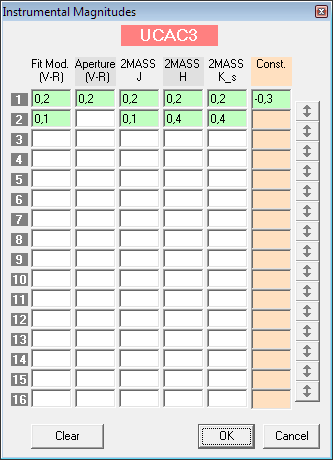
Through this dialog box, it is possible to define one or several rules to combine together the different magnitude bands. Each combination is characterized by a set of coefficients that will be used to compute a resulting instrumental magnitude through a first degree polynom with a constant term (the last column Const. in the table). In the example above, the first rule specifies a compound instrumental magnitude that is expressed by the following formula:
M = 0,2 * M_Fit_Mod_V_R + 0,2 * M_Aperture_V_R + 0,2 * M_2MASS_J + 0,2 * M_2MASS_H + 0,2 * M_2MASS_K_s - 0,3
For a given object, if a magnitude required to compute the compound instrumental magnitude, the rule is ignored and the next one in the list is used until a rule can be applied. If there is no rule that can be applied, then the object is considered as not having a magnitude defined. It is possible to change the order of the rules using the small buttons with arrows on the right side of the dialog box. These buttons swap the values in two adjacent lines.
It must be noted that nothing prevents a user to use arbitrary values for the coefficients, and the resulting magnitude can sometimes be surprizing... This function is therefore to be used with great caution. It can however be really powerful to represent fields in a realistic manner to match a given optical configuration used to produce images.